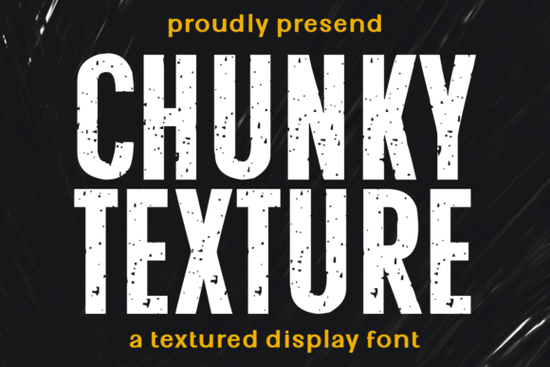
When you need a typeface that communicates strength and authenticity without trying too hard, Chunky Texture delivers. This grunge display font uses bold, distressed letterforms that look like they have been stamped onto paper or fabric. The rough edges and uneven textures give each character a handcrafted feel that modern audiences trust more than polished perfection. It carries a rugged masculinity that works naturally for gym apparel, automotive branding, coffee packaging, and barbershop logos. The font sits comfortably in industrial design, streetwear, and any project where you want to communicate grit and realness.
Whether you are designing a T-shirt, building a brand identity, or creating mockups for a client, Chunky Texture gives you a look that feels earned rather than manufactured. The distressed texture does the heavy lifting, so you spend less time trying to make things look worn and more time focusing on composition and layout.
What can you actually design with Chunky Texture Font?
This is not a font for long paragraphs of body text. It is a display typeface made for headlines, logos, short phrases, and anything where the letters need to carry visual weight. Here are some practical uses that designers and print-on-demand sellers have found for it:
- T-shirt graphics – Bold statements, brand names, or mascot-style text on gym wear and streetwear
- Logo design – Barbershops, mechanics, breweries, and outdoor brands that want a handcrafted look
- Packaging – Coffee bags, craft beer labels, and artisanal product boxes that benefit from a vintage stamp feel
- Posters and signage – Event posters, automotive ads, and outdoor signage where readability meets attitude
- Merchandise mockups – Tote bags, hats, hoodies, and stickers that need a bold visual anchor
The font works especially well at larger sizes, where the texture becomes more visible and adds depth to the design. On screen, it brings a tactile quality that helps digital designs feel more physical.
How does Chunky Texture compare with other display fonts?
Every display font serves a different mood. Comparing Chunky Texture to other options in the Creative Fabrica library shows how much the texture changes the personality of the letterforms.
The Sunspell font offers a cleaner, more elegant display look that works well for refined branding. It is the opposite of Chunky Texture in many ways, which makes it useful when you need to pair contrasting fonts within the same project.
For a different vintage approach, the Retro Script font brings flowing, connected letterforms that feel nostalgic and friendly. Where Chunky Texture punches with straight, bold shapes, Retro Script curves and connects.
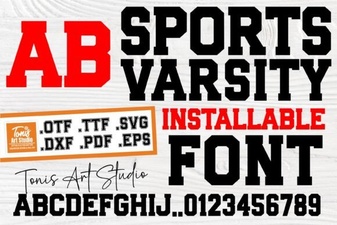
The College Black font shares a similar bold weight but with a cleaner, sports-inspired look. If the grunge texture feels too rough for a particular client, College Black gives you the boldness without the wear.
The Welcome display font takes a friendlier, more decorative approach while still making a strong visual statement. It works well for hospitality and event branding where Chunky Texture might feel too industrial.
For projects that need a relaxed, tropical mood, Laguna Tropic offers a completely different energy. It shows how much the style of a display font can shift the feeling of a design.
Choosing the right font comes down to matching the personality of the typeface with the message of the brand. Chunky Texture works best when you want to communicate durability, authenticity, and a no-nonsense attitude.
What should you watch out for when using a grunge font?
Grunge and distressed fonts are powerful tools, but they come with some practical considerations:
- Readability at small sizes – The texture can make letters harder to read when printed or displayed small. Stick to larger sizes for key text.
- Not for body text – This is a display font only. Use it for headlines, logos, and short phrases, not for paragraphs.
- Context matters – The distressed look fits certain industries and brands better than others. It works great for automotive, outdoor, and industrial brands but can feel out of place in corporate or luxury settings.
- Pair with clean fonts – Balance the roughness with a clean, simple sans-serif or serif font for supporting text. This creates contrast and improves overall readability.
- Test your medium – If you are selling on print-on-demand platforms, check how the texture reproduces on different fabric types and printing methods.
Quick tips for getting started with Chunky Texture Font
If you are ready to try Chunky Texture in your next project, here is a simple workflow to get the most out of it:
- Download the font and install it on your system.
- Open your design software and type your headline or logo text at a large size (72pt or higher).
- Adjust letter spacing manually if needed – some distressed fonts need a little breathing room between characters.
- Test the design on a mockup that matches your final medium (fabric, paper, or screen).
- Pair it with a neutral, clean font for any secondary text to keep the layout balanced.
Chunky Texture Font gives you a shortcut to that worn, authentic look that so many brands are after today. It is a practical tool for anyone designing for industries where strength and character matter more than polish.
Explore Design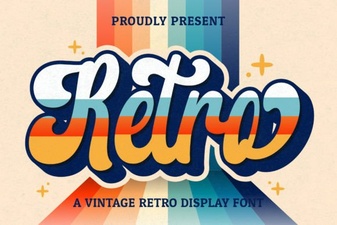 Retro Script Fonts for Modern & Creative Design Projects
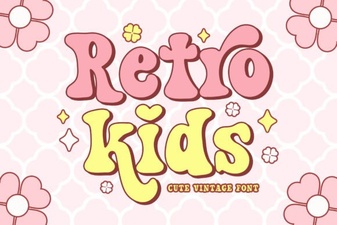 Retro Fonts for Creative Kids Projects
 Sports Varsity Font Styles & Free Downloads
 Cormorant Garamond Font: Design & Project Ideas
 Mastering Typography with Designer Fonts
 Festive Christmas Fonts for Holiday Projects